
LoRa S.A.O - L.E.M

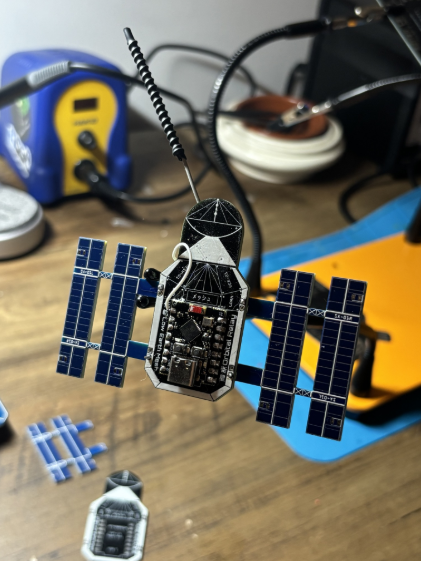
Custom LoRa Meshtastic SAO, ESP32-C3 + E22-900M22S (SX1262)
What it is
L.E.M (Low Earth Mesh) is a SAO ("Shitty Add-On", the small 2×3 connector you'll find on hacker conference badges) that packs a real Meshtastic radio node, a long-range, encrypted LoRa mesh network with no infrastructure (no cell tower, no wifi, just LoRa relayed peer-to-peer from node to node).
Two ways to use it:
-
Standalone node: a plain Meshtastic node on this hardware, configured from the Meshtastic app over Bluetooth. Nothing else.
-
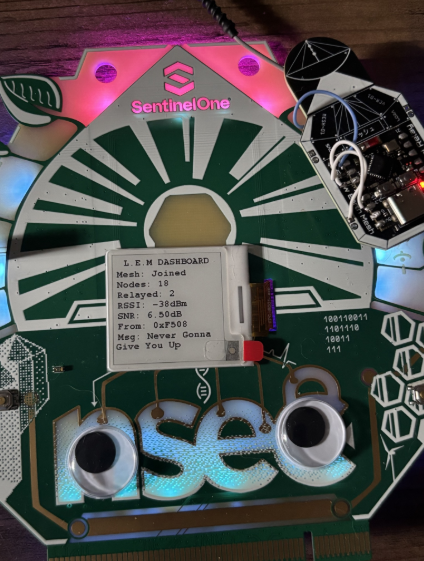
Badge SAO: plugged into a host badge (here, the NorthSec 2026 conference badge) through the SAO connector, it exposes live mesh state (node count, packets relayed, RSSI/SNR, last received message) and the badge can send messages through it. The badge adds a full e-ink UI on top (dashboard, messaging, node tracking, etc.)
The firmware is a fork of Meshtastic, not a rewrite; only a thin layer
(LemSaoModule) was added SAO-side to expose this protocol to the badge.
Technical details
Hardware (body v2):
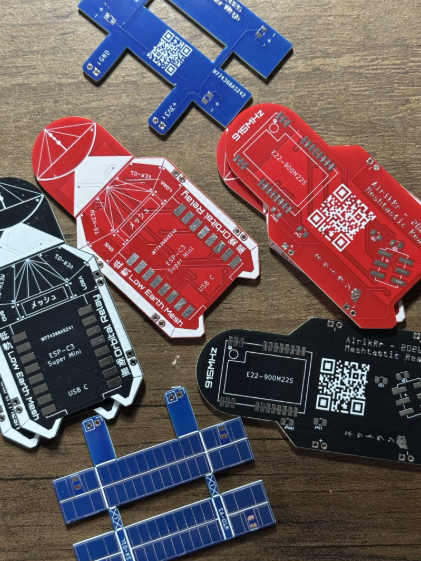
Two 10k I2C pull-ups were added in v2 (SCL on GPIO2, a strapping pin, this secures the boot) plus a 10µF bulk cap on the E22's VCC (anti brown-out on TX).
Why a custom build instead of the Meshtastic web flasher: the radio
wiring is non-standard (a discrete E22 on a C3, not an off-the-shelf board
from the official catalog), so the pins are baked into variant.h at
compile time; no pre-built firmware from the catalog can match it.
SAO ↔ badge link: unlike the usual I2C convention for SAOs, this one
runs UART over the connector's two signal pins (115200 baud, a full
read block ~80 bytes takes ~7-8ms, well under the badge's 3Hz poll rate).
Custom framed protocol (0xAA request / 0x55 response, CRC8), with a
register map exposing mesh state for reading (node count, RSSI/SNR, last
message, role/hop of the last sender...) and a write buffer to send a
message. Full details live in the repo's register map doc.
Precautions
-
Antenna required before any transmission. The E22 has an external PA: transmitting with no antenna plugged into the U.FL can damage it.
-
Never plug the SAO and USB-C at the same time. Both power the board, there's no guarantee on behavior if both sources are active.
-
GPIO2, GPIO8, and GPIO9 are strapping pins on the C3; never route an external signal onto them with an uncertain reset-time state. A v1 board ended up stuck in download mode because of this (GPIO9 held low by an external signal).
-
Radio region = US (915MHz), regardless of mode (standalone or SAO): that's the band this hardware is wired/tested for.
-
The R1 pull-up (v2, GPIO2/SCL) is what fixed cold-boot reliability; if a v2 board ever becomes flaky on boot again after an unplug/replug, that's the first thing to check.
How to flash: standalone SAO (autonomous node)
Prerequisites (Windows): Git, VS Code + the PlatformIO IDE extension
(bundles its own Python, nothing else to install), and ideally Microsoft's
Serial Monitor extension (PlatformIO's built-in monitor loops on
ClearCommError against the C3's native USB-JTAG controller).
-
Clone vanilla Meshtastic firmware (upstream, not the fork):
git clone --recurse-submodules https://github.com/meshtastic/firmware.git cd firmware git submodule update --init -
Copy the
variant/lem/folder from the LowEarthMesh repo intovariants/esp32c3/lem/in the firmware tree. This folder holds two files:-
platformio.ini: the new[env:lem-esp32c3-sx1262]environment, identityPRIVATE_HW(no official model), and the build flags specific to this wiring (no screen, native USB CDC, etc.) -
variant.h: defines SPI, the SX1262's control pins (watch for the GPIO9→GPIO0 bodge on BUSY), the E22's TCXO voltage, and the Super Mini's onboard LED.
-
-
Build (from the PlatformIO Core CLI terminal, not a plain PowerShell:
pioisn't on PATH otherwise):pio run -e lem-esp32c3-sx1262First build: 20-40 min (toolchain download). Cached after that. Only
*** ErrororFAILEDlines matter; ignorewarning:lines. -
Connect over USB-C (never with the SAO plugged in at the same time), then flash:
pio run -e lem-esp32c3-sx1262 -t upload --upload-port COM7If it hangs on
Connecting....____: hold BOOT, tap RST, release BOOT, retry (auto-reset is unreliable over native USB withCDC_ON_BOOT). -
Check at boot (via the serial monitor, 115200 baud): a
SX1262 init result 0or equivalent confirms SPI/radio are good. -
Configure the network over Bluetooth via the Meshtastic app (see Setting up a node below).
Integrating the NorthSec 2026 badge (SAO mode)
This path uses the dedicated Meshtastic fork (variant + LemSaoModule
already in the tree; no need to copy variant/lem/ by hand):
git clone --recurse-submodules -b develop https://github.com/AlrikRr/Meshtastic-Firmware.git
cd Meshtastic-Firmware
git submodule update --init
Open the folder in VS Code (the one with the root platformio.ini), then
build/flash exactly as above with the lem-esp32c3-sx1262 environment;
nothing else to configure.
Once flashed, this SAO talks over UART to the badge firmware (branch
feature-lem-sao of the badge-2026 fork), which continuously reads mesh
state and adds on top of it:
-
Dashboard: node count, packets relayed, RSSI/SNR, last message, the docked SAO's own name.
-
Messaging: last received text (DM or broadcast), with a dedicated LED notification on DMs.
-
SIGINT Constellation + Target Lock: every node heard gets classified (role + hop distance), lock onto one and a NeoPixel radar pulse gets faster/redder as its signal strengthens.
-
LemDex: a persistent (NVS-backed) collection of every node ever discovered, "tactical space RPG" style, browsable as filterable cards.
-
Orbital Docking: two badges bumped together over NFC exchange their SAO's public key/contact info directly, without waiting on mesh NodeInfo propagation.
-
Bluetooth PIN relay: the SAO has no screen; the badge reads the SAO's BLE pairing PIN off a dedicated register and displays it.
-
Sleep / dock-disconnect feedback: e-ink + LED feedback on dock/pull, a long-press standby mode with LEDs and screen off.
All of this lives badge-side; the SAO firmware stays deliberately lean, it only exposes the register map.
Setting up a node (runtime config)
No screen on this hardware: all configuration happens through the Meshtastic app over Bluetooth (BLE).
- Region: US (915MHz), required, regardless of mode.
- Role:
ROUTERfor pairing with the badge (SAO mode). In standalone mode, any role that fits your deployment. - Bluetooth pairing PIN:
-
SAO mode:
LemSaoModuleforces aRANDOM_PINon every boot (in RAM only). Since the SAO has no screen, the docked badge reads it back (BLE_PINregister) and displays it. Nothing to configure on the SAO side. -
Standalone mode: with no screen, Meshtastic falls back to its default fixed PIN (
123456) until changed, either at runtime (meshtastic --set bluetooth.fixed_pin 654321or via the app), or at compile time to flash a batch of boards with a set default PIN (userPrefs.jsonc, keyUSERPREFS_FIXED_BLUETOOTH).
-